
Work Text:
The very short version of how to post your fanwork to Pod Together Lightning.
- Post to Pod Together Lightning Round X sub-collection.
- Add co-authors.
- Add challenge and fanwork-specific tags.
- Wait until reveals.
- On the 30th, enjoy all the fanworks!
The longer version of how to post your fanwork to Pod Together Lightning.
Pod Together Lightning Round X Sub-Collection
Tag section of form
Preface section of form
Assoications section of form
Work Text section of form
Posting to Reveals
Each round of the Pod Together Lightning Challenge has a corresponding sub-collection in the Pod Together Lightning Collections. For Round 1, that collection is Pod Together Lightning Round 1. Each collection will remain unrevealed until the 30th of the month, at which point all fanworks will be revealed simultaneously.
The easiest way to post to the collection is to go to Pod Together Lightning Round 1 and select Post To Collection.
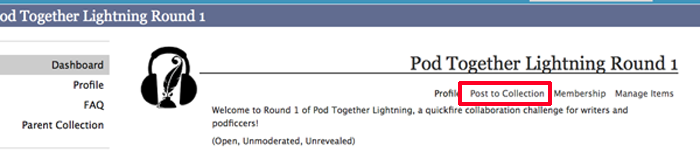
If you select Post To Collection through the collection's page, the collection will be automatically selected and the fanwork will remain a Mystery Work until reveals.
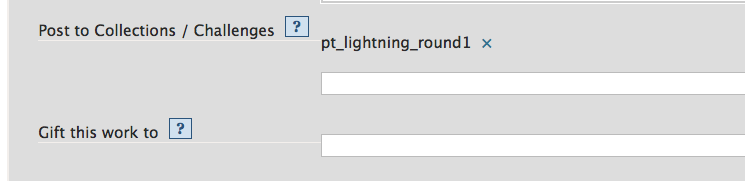
Alternatively, you can manually add the collection during the posting process (see below).
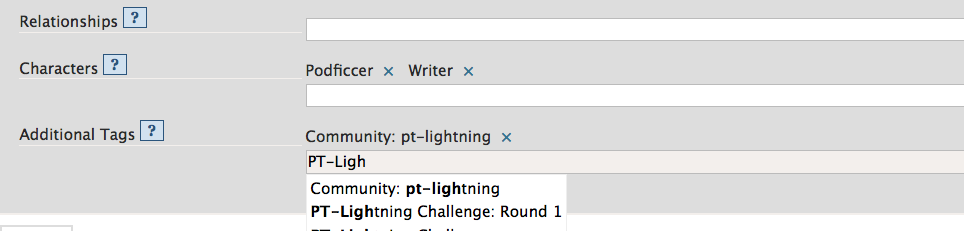
Fill in the Tags section, fill out Rating, Archive Warnings, Fandoms, Category, Relationships, Characters, and Additional Tags appropriately.
We have two challenge-specific tags for the Additional Tags field that you can use: "Community: pt-lightning" and PT-Lightning Challenge: Round 1". Each round will have a corresponding round tag.
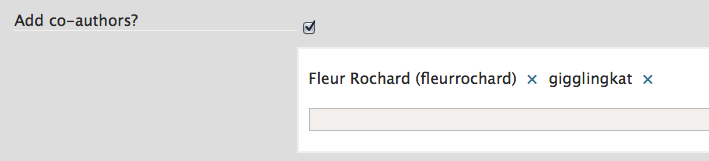
In the Preface section, add the Title. Check "Add Co-author(s)?" and make sure each collaborator is added as a Co-author; otherwise they can't see or edit the fanwork. Add the Summary and any desired Notes.
For example, in In a world..., somnolentblue posted and added fleurrochard and gigglingkat as co-authors.
Associations
In the Associations section, double check that Post to Collections/Challenges is filled out with the name of the Round's Sub-collection, Pod Together Lightning Round 1 (pt_lightning_round1).
You can manually add the collection's name at this point. If you start typing "PT-Lightning" or "Pod Together Lightning", the sub-collection's name will appear in the drop-down list. Select the appropriate sub-collection for the Round. For example, the sub-collection for Round 1 is Pod Together Lightning Round 1 (pt_lightning_round1).

In the Work Text section, add your fanwork.
To embed the podfic as a stream, the code is:
<embed type="application/x-shockwave-flash" flashvars="audioUrl=http://[ADDRESS GOES HERE].mp3" src="http://podfic.com/player/audio-player.swf" width="400" height="27" allowscriptaccess="never" allownetworking="internal"></embed>
For example, the code to embed Trailer 1: In a world... is:
<embed type="application/x-shockwave-flash" flashvars="audioUrl=http://pt-lightning.parakaproductions.com/promo/ptlightningtrailer1.mp3" src="http://podfic.com/player/audio-player.swf" width="400" height="27" allowscriptaccess="never" allownetworking="internal"></embed>
This yields:
Once everything is filled out, hit Post!
Your fanwork should post as a Mystery Work, and it will remain hidden until the collection is revealed. At the top of the fanwork should be the text: "This work is part of an ongoing challenge and should be revealed soon. You can find details here: Pod Together Lightning Round 1."
Your fanwork will not be accessible through your dashboard while it is unrevealed. I recommend bookmarking it when you post to facilitate finding it later.
You can also access your fanwork through the Pod Together Lightning Round 1 Sub-Collection. If you go to Pod Together Lightning Round 1 Works, you will find your fanwork in the list; it will be the only one that does not appear as a Mystery Work.
Fanworks will be revealed on the 30th! Once your fanwork is revealed, you might consider changing the publication date to Nov. 30 so that it's picked up by relevant feeds and appears on your fandom's Recent Works page.